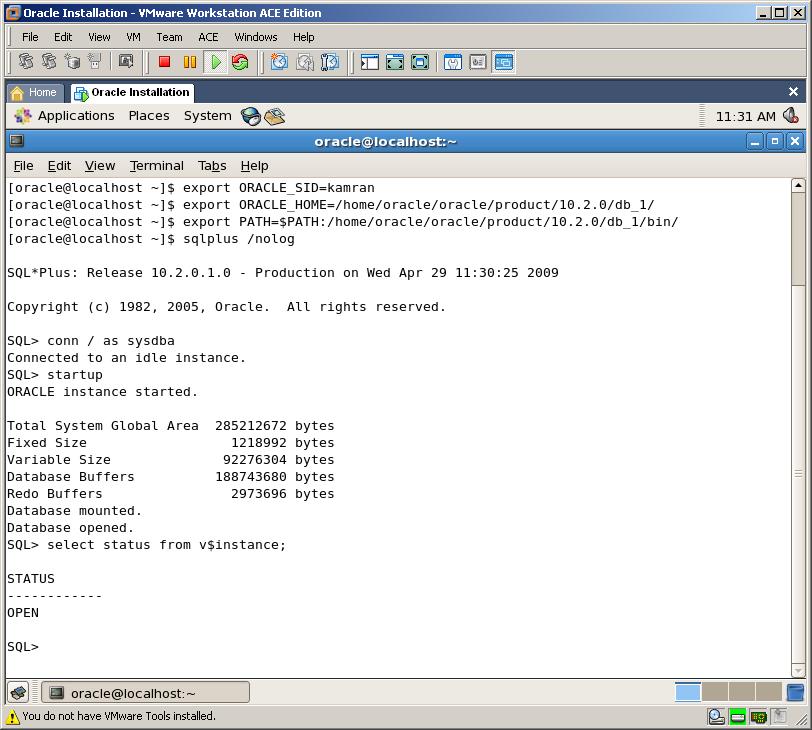
Set the restart flag to “Y” in
/etc/oratab, from something like this
dbname:/u01/app/oracle/product/10.2.0/db_1:
N
to something like
dbname:/u01/app/oracle/product/10.2.0/db_1:
Y
Copy&paste the boot script code that follows into /etc/init.d/dbora (the file dbora doesn’t exists, so create it) and modify the bold values to reflect your installation:
#!/bin/sh
# description: Oracle auto start-stop script.
#
# Set ORA_HOME to be equivalent to the $ORACLE_HOME
# from which you wish to execute dbstart and dbshut;
#
# Set ORA_OWNER to the user id of the owner of the
# Oracle database in ORA_HOME.

ORACLE_HOME=/u01/app/oracle/product/10.2.0/db_1
PATH=$PATH:$ORACLE_HOME/bin
export ORACLE_HOME PATH

ORA_HOME=/u01/app/oracle/product/10.2.0/db_1
ORA_OWNER=oracle

if [ ! -f $ORA_HOME/bin/dbstart ]
then
    echo "Oracle startup: cannot start"
    exit
fi

case "$1" in
    'start')
        # Start the Oracle databases:
        # The following command assumes that the oracle login
        # will not prompt the user for any values
        su $ORA_OWNER -c "$ORA_HOME/bin/dbstart $ORA_HOME"
        ;;
    'stop')
        # Stop the Oracle databases:
        # The following command assumes that the oracle login
        # will not prompt the user for any values
        su $ORA_OWNER -c "$ORA_HOME/bin/dbshut $ORA_HOME"
        ;;
esac
Assign proper script privileges:
chmod 750 /etc/init.d/dbora
Create the symbolic links related to boot runlevels [since I'm a long-time-Slackware-user and pretty new to Ubuntu, I'm not well versed about Ubuntu boot system so feel free to correct me (the comments are at the end of the post)]:
ln -s /etc/init.d/dbora /etc/rc0.d/k01dbora
ln -s /etc/init.d/dbora /etc/rc1.d/k01dbora
ln -s /etc/init.d/dbora /etc/rc2.d/S99dbora
ln -s /etc/init.d/dbora /etc/rc3.d/S99dbora
ln -s /etc/init.d/dbora /etc/rc4.d/S99dbora
at the end you should have something like this:
lrwxrwxrwx 1 root root   17 2008-07-16 14:16 /etc/rc0.d/k01dbora -> /etc/init.d/dbora
lrwxrwxrwx 1 root root   17 2008-07-16 14:16 /etc/rc1.d/k01dbora -> /etc/init.d/dbora
lrwxrwxrwx 1 root root   17 2008-07-16 14:16 /etc/rc2.d/S99dbora -> /etc/init.d/dbora
lrwxrwxrwx 1 root root   17 2008-07-16 14:16 /etc/rc3.d/S99dbora -> /etc/init.d/dbora
lrwxrwxrwx 1 root root   17 2008-07-16 14:16 /etc/rc4.d/S99dbora -> /etc/init.d/dbora
Release 2 bug: inside /u01/app/oracle/product/10.2.0/db_1/bin/dbstart there is a bug that will prevent the listener to start (
Failed to auto-start Oracle Net Listener using /ade/vikrkuma_new/oracle/bin/tnslsnr); to solve change line 78 from
ORACLE_HOME_LISTNER=/ade/vikrkuma_new/oracle/bin/tnslsnr
to
ORACLE_HOME_LISTNER=$ORACLE_HOME
TRIK ...
jika system sudah direstart tetapi database belum otomatis startup
coba copy paste script ini di /u01/app/oracle/product/10.2.0/db_1/bin/dbstart
dengan perintah
sudo gedit /u01/app/oracle/product/10.2.0/db_1/bin/dbstart
LOGMSG="logger -puser.alert -s "
trap 'exit' 1 2 3
# for script tracing
case $ORACLE_TRACE in
T) set -x ;;
esac
# Set path if path not set (if called from /etc/rc)
case $PATH in
"") PATH=/bin:/usr/bin:/etc
export PATH ;;
esac
# Save LD_LIBRARY_PATH
SAVE_LLP=$LD_LIBRARY_PATH
# Set this to bring up Oracle Net Listener
#ORACLE_HOME_LISTNER=/ade/vikrkuma_new/oracle
ORACLE_HOME_LISTNER=$ORACLE_HOME
if [ ! $ORACLE_HOME_LISTNER ] ; then
echo "ORACLE_HOME_LISTNER is not SET, unable to auto-start Oracle Net Listener"
else
LOG=$ORACLE_HOME_LISTNER/listener.log
# Start Oracle Net Listener
if [ -f $ORACLE_HOME_LISTNER/bin/tnslsnr ] ; then
echo "$0: Starting Oracle Net Listener" >> $LOG 2>&1
$ORACLE_HOME_LISTNER/bin/lsnrctl start >> $LOG 2>&1 &
export VER10LIST=`$ORACLE_HOME_LISTNER/bin/lsnrctl version | grep "LSNRCTL for " | cut -d' ' -f5 | cut -d'.' -f1`
else
echo "Failed to auto-start Oracle Net Listene using $ORACLE_HOME_LISTNER/bin/tnslsnr"
fi
fi
# Set this in accordance with the platform
ORATAB=/etc/oratab
if [ ! $ORATAB ] ; then
echo "Set ORATAB to dir where oratab file is located"
exit 1;
fi
# Checks Version Mismatch between Listener and Database Instance.
# A version 10 listener is required for an Oracle Database 10g database.
# Previous versions of the listener are not supported for use with an Oracle
# Database 10g database. However, it is possible to use a version 10 listener
# with previous versions of the Oracle database.
checkversionmismatch() {
if [ $VER10LIST ] ; then
VER10INST=`sqlplus -V | grep "Release " | cut -d' ' -f3 | cut -d'.' -f1`
case $VER10INST in
"10")
if [ $VER10LIST != "10" ] ; then
$LOGMSG "Warning: Version 10 listener is required for Oracle Database 10g"
$LOGMSG "Version $VER10LIST for Listener is NOT supported with Database version $VER10INST"
$LOGMSG "Restart Oracle Net Listener using an alternate ORACLE_HOME_LISTNER: lsnrctl start"
fi
;;
*) ;;
esac
fi
}
# Starts a Database Instance
startinst() {
# Called programs use same database ID
export ORACLE_SID
# Put $ORACLE_HOME/bin into PATH and export.
PATH=$ORACLE_HOME/bin:/bin:/usr/bin:/etc ; export PATH
# add for bug # 652997
LD_LIBRARY_PATH=${SAVE_LLP}:${ORACLE_HOME}/lib ; export LD_LIBRARY_PATH
PFILE=${ORACLE_HOME}/dbs/init${ORACLE_SID}.ora
SPFILE=${ORACLE_HOME}/dbs/spfile${ORACLE_SID}.ora
SPFILE1=${ORACLE_HOME}/dbs/spfile.ora
echo ""
echo "$0: Starting up database \"$ORACLE_SID\""
date
echo ""
checkversionmismatch
# See if it is a V6 or V7 database
VERSION=undef
if [ -f $ORACLE_HOME/bin/sqldba ] ; then
SQLDBA=sqldba
VERSION=`$ORACLE_HOME/bin/sqldba command=exit | awk '
/SQL\*DBA: (Release|Version)/ {split($3, V, ".") ;
print V[1]}'`
case $VERSION in
"6") ;;
*) VERSION="internal" ;;
esac
else
if [ -f $ORACLE_HOME/bin/svrmgrl ] ; then
SQLDBA=svrmgrl
VERSION="internal"
else
SQLDBA="sqlplus /nolog"
fi
fi
STATUS=1
if [ -f $ORACLE_HOME/dbs/sgadef${ORACLE_SID}.dbf ] ; then
STATUS="-1"
fi
if [ -f $ORACLE_HOME/dbs/sgadef${ORACLE_SID}.ora ] ; then
STATUS="-1"
fi
pmon=`ps -ef | egrep pmon_$ORACLE_SID | grep -v grep`
if [ "$pmon" != "" ];
then
STATUS="-1"
$LOGMSG "Warning: ${INST} \"${ORACLE_SID}\" already started."
fi
if test $STATUS -eq -1 ; then
$LOGMSG "Warning: ${INST} \"${ORACLE_SID}\" possibly left running when system went down (system crash?)."
$LOGMSG "Action: Notify Database Administrator."
case $VERSION in
"6") sqldba "command=shutdown abort" ;;
"internal") $SQLDBA $args <<EOF
connect internal
shutdown abort
EOF
;;
*) $SQLDBA $args <<EOF
connect / as sysdba
shutdown abort
quit
EOF
;;
esac
if test $? -eq 0 ; then
STATUS=1
else
$LOGMSG "Error: ${INST} \"${ORACLE_SID}\" NOT started."
fi
fi
if test $STATUS -eq 1 ; then
if [ -f $SPFILE -o -f $SPFILE1 -o -f $PFILE ] ; then
case $VERSION in
"6") sqldba command=startup ;;
"internal") $SQLDBA <<EOF
connect internal
startup
EOF
;;
*) $SQLDBA <<EOF
connect / as sysdba
startup
quit
EOF
;;
esac
if test $? -eq 0 ; then
echo ""
echo "$0: ${INST} \"${ORACLE_SID}\" warm started."
else
$LOGMSG ""
$LOGMSG "Error: ${INST} \"${ORACLE_SID}\" NOT started."
fi
else
$LOGMSG ""
$LOGMSG "Can't find init file for ${INST} \"${ORACLE_SID}\"."
$LOGMSG "Error: ${INST} \"${ORACLE_SID}\" NOT started."
fi
fi
}
# Starts an ASM Instance
startasminst() {
# Called programs use same database ID
export ORACLE_SID
ORACLE_HOME=`echo $LINE | awk -F: '{print $2}' -`
# Called scripts use same home directory
export ORACLE_HOME
# For ASM instances, we have a dependency on the CSS service.
# Wait here for it to become available before instance startup.
# Is the 10g install intact? Are all necessary binaries present?
if [ ! -f $ORACLE_HOME/bin/crsctl ]; then
$LOGMSG "$ORACLE_HOME/bin/crsctl not found when attempting to start"
$LOGMSG " ASM instance $ORACLE_SID."
else
COUNT=0
$ORACLE_HOME/bin/crsctl check css
RC=$?
while [ "$RC" != "0" ];
do
COUNT=$((COUNT+1))
if [ $COUNT = 15 ] ; then
# 15 tries with 20 sec interval => 5 minutes timeout
$LOGMSG "Timed out waiting to start ASM instance $ORACLE_SID"
$LOGMSG " CSS service is NOT available."
exit $COUNT
fi
$LOGMSG "Waiting for Oracle CSS service to be available before starting "
$LOGMSG " ASM instance $ORACLE_SID. Wait $COUNT."
sleep 20
$ORACLE_HOME/bin/crsctl check css
RC=$?
done
fi
startinst
}
# Start of dbstartup script
#
# Loop for every entry in oratab file and and try to start
# that ORACLE.
#
# ASM instances need to be started before 'Database instances'
# ASM instance is identified with '+' prefix in ORACLE_SID
# Following loop brings up ASM instance[s]
cat $ORATAB | while read LINE
do
case $LINE in
\#*) ;; #comment-line in oratab
*)
# Proceed only if last field is 'Y'.
# Entries whose last field is not Y or N are not DB entry, ignore them.
if [ "`echo $LINE | awk -F: '{print $NF}' -`" = "Y" ] ; then
ORACLE_SID=`echo $LINE | awk -F: '{print $1}' -`
if [ "$ORACLE_SID" = '*' ] ; then
# same as NULL SID - ignore this entry
ORACLE_SID=""
continue
fi
# For ASM instances, we have a dependency on the CSS service.
# Wait here for it to become available before instance startup.
if [ `echo $ORACLE_SID | cut -b 1` = '+' ]; then
INST="ASM instance"
ORACLE_HOME=`echo $LINE | awk -F: '{print $2}' -`
# Called scripts use same home directory
export ORACLE_HOME
# file for logging script's output
LOG=$ORACLE_HOME/startup.log
touch $LOG
chmod a+r $LOG
echo "Processing $INST \"$ORACLE_SID\": log file $ORACLE_HOME/startup.log"
startasminst >> $LOG 2>&1
fi
fi
;;
esac
done
# exit if there was any trouble bringing up ASM instance[s]
if [ "$?" != "0" ] ; then
exit 2
fi
#
# Following loop brings up 'Database instances'
#
cat $ORATAB | while read LINE
do
case $LINE in
\#*) ;; #comment-line in oratab
*)
# Proceed only if last field is 'Y'.
# Entries whose last field is not Y or N are not DB entry, ignore them.
if [ "`echo $LINE | awk -F: '{print $NF}' -`" = "Y" ] ; then
ORACLE_SID=`echo $LINE | awk -F: '{print $1}' -`
if [ "$ORACLE_SID" = '*' ] ; then
# same as NULL SID - ignore this entry
ORACLE_SID=""
continue
fi
# For ASM instances, we have a dependency on the CSS service.
# Wait here for it to become available before instance startup.
if [ `echo $ORACLE_SID | cut -b 1` != '+' ]; then
INST="Database instance"
ORACLE_HOME=`echo $LINE | awk -F: '{print $2}' -`
# Called scripts use same home directory
export ORACLE_HOME
# file for logging script's output
LOG=$ORACLE_HOME/startup.log
touch $LOG
chmod a+r $LOG
echo "Processing $INST \"$ORACLE_SID\": log file $ORACLE_HOME/startup.log"
startinst >> $LOG 2>&1
fi
fi
;;
esac
done
 12.51
12.51
 Cyber
Cyber